There are 68 collapsible module positions. If no module is published to a position, it will not appear, collapsing the entire area.

Non-Standard Elements

There are non-standard elements that are injected into the template grid structure when enabled via the template parameter.

For example: The logo element is injected into the header-a position. It is inserted in a stacked fashion, meaning, if there are modules published to the header-a position, they will appear in the same column as the logo, just one place below.

You can change the positions of these elements at Extensions → Template Manager → rt_panacea_j15

Layout Control

The positions themselves are highly configurable, with the ability to change the width allocation depending on how many positions are published to a particular module row, such as feature-a/f. This is also applicable to the mainbody which, provides for an easy mechanism to switch the positions and widths of the side columns. For more information, check the documentation linked below.

Gantry Framework : Layouts Documentation

Preview

View all module positions live by appending ?tp=1 or &tp=1 to the end of your URL such as http://yoursite.com/index.php?tp=1.

The below diagram is of the Module Variations page.
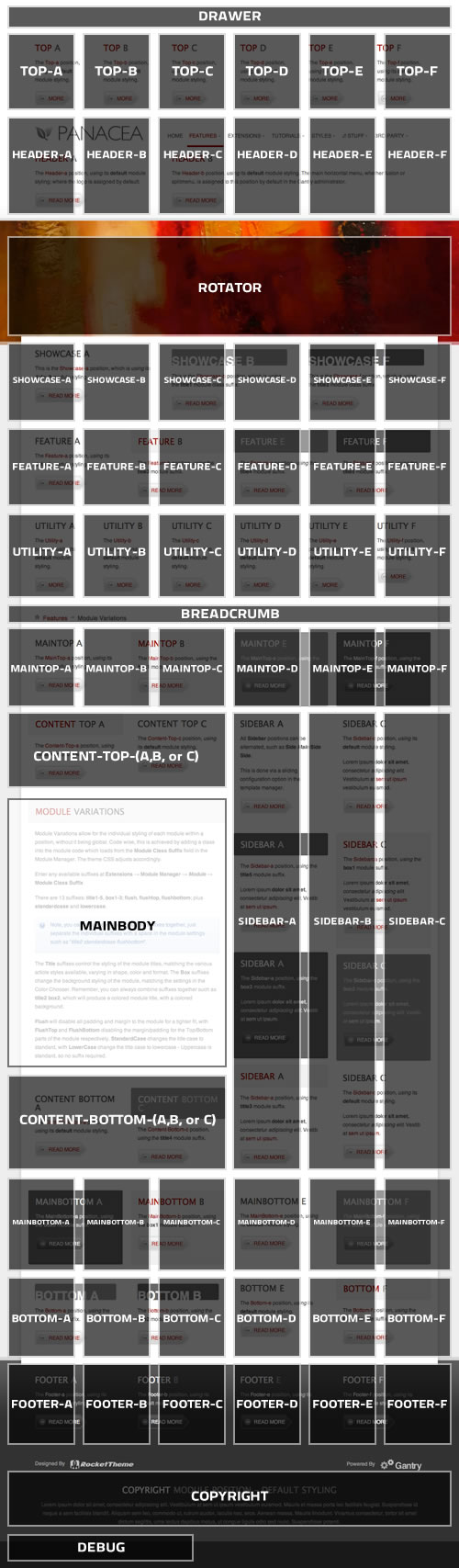
Module Positions

Typography is a fundamental part of a template, providing you with the tools to characterise your content and bring it to life. There is a vast array of typography available with this template, as is with our previous releases, from list styles, notice blocks and a diverse number of other elements.

There are 2 methods in which to implement the typography into your Joomla content:

  • HTML Mode: This is the traditional approach for implementing typography as used in the pre-2009 templates / demos, where you had to use HTML coding / syntax for the typography. This presents two main problems: the Joomla WYSIWYG editor is notorious for stripping out HTML so could easily remove your formatted article and no typography; secondly, using HTML for typography may present a problem for certain users who are unaccustomed to HTML and coding.

  • RokCandy Mode: The RokCandy component from RocketTheme allows you to implement typography easily, without fear of the WYSIWYG editor ruining your formatting and allows you, and/or your clients to add them to your content with ease. This is through a method similar to BBcode (as seen in a forum). WYSIWYG friendly syntax can be used, or even custom configured that will transform a set snippet to the correct HTML when it is parsed by Joomla.

Why use RokCandy?

RokCandy is the ideal solution for those with limited coding skills or those who implement our templates for their clients. It is free from the WYSIWYG editors horrific filtering habits and can be easily pre-configured for your personal needs or the needs of your client.

RokCandy Typography

RokCandy Example

The RokCandy Typography button is created by using the following syntax with RokCandy:

[readon url="/typography/rokcandy-examples"]RokCandy Typography[/readon]

However, if we were to use HTML, the following code would be required:

<p>
  <a class="readon" href="/typography/rokcandy-examples">
    <span>Read more...</span>
  </a>
</p>

As you can see, the RokCandy version is a lot easier to use.